Setting Up SMSTools in LXC With Terraform
Overview
SMSTools3 is an SMS gateway daemon that communicates with GSM modems to send and receive text messages. When combined with LXC containers and infrastructure-as-code tools like Terraform, you can create isolated, reproducible SMS processing environments. This guide covers installing and configuring SMSTools in an LXC container, both manually and using automation tools.
Hardware: GSM Modems
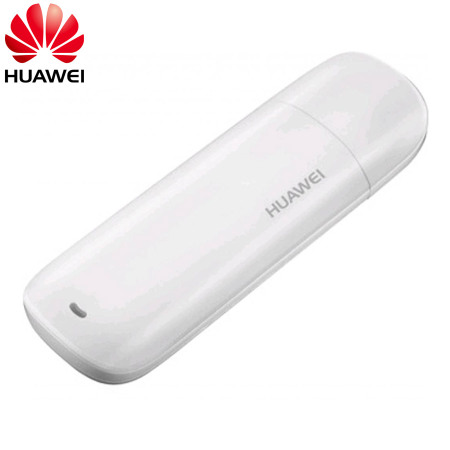
This guide uses older Huawei GSM modems that are widely available and inexpensive. Common models include:
- Huawei E173 - 3G HSDPA USB stick (USB ID: 12d1:1c05 or similar)
- Huawei E3531 - 3G HSPA+ USB modem (USB ID: 12d1:1c10 or similar)
These modems are legacy devices from the 3G era, making them perfect for SMS applications. Since they’re no longer current technology, you can find them used on marketplaces like eBay or Alibaba typically ranging from $5-$15 USD depending on condition and seller. Some listings offer bulk quantities at even better prices.
Why these old modems work great:
- Simple USB serial interface (appears as
/dev/ttyUSB0) - Well-supported by Linux kernel drivers
- No complex mode switching required
- Reliable SMS functionality
- Cheap enough to have multiple units for redundancy
- Low power consumption
The 4G LTE Mall provides detailed specifications for these models if you need more technical information.
Why LXC for SMS Processing?
LXC containers provide an ideal environment for GSM modem management:
- Direct USB Passthrough: LXC handles USB devices more naturally than Docker or full VMs
- Resource Efficiency: Minimal overhead compared to traditional virtualization
- Isolation: Each modem can run in its own container without interference
- Persistence: Containers survive host reboots without special orchestration
For SMS processing, this means you can attach a GSM modem via USB passthrough and have it appear as a standard /dev/ttyUSB0 device inside the container, exactly as it would on a bare metal system.
Prerequisites
- Proxmox VE or similar LXC-capable host
- GSM modem with USB connectivity (Huawei modems work well)
- Basic understanding of Linux system administration
- (Optional) Terraform installed for automated provisioning
Manual Installation
Step 1: Create the LXC Container
On your Proxmox host, create an Ubuntu container:
pct create 751 local:vztmpl/ubuntu-22.04-standard_22.04-1_amd64.tar.zst \
    --hostname gsm-modem-1 \
    --memory 512 \
    --cores 1 \
    --net0 name=eth0,bridge=vmbr0,ip=dhcp \
    --storage local-lvm \
    --rootfs local-lvm:4
Step 2: Configure USB Passthrough
Find your modem’s USB device IDs:
lsusb | grep Huawei
# Output: Bus 001 Device 005: ID 12d1:1c10 Huawei Technologies Co., Ltd.
Edit the container configuration (/etc/pve/lxc/751.conf) and add:
lxc.cgroup2.devices.allow: c 188:* rwm
lxc.mount.entry: /dev/bus/usb/001 dev/bus/usb/001 none bind,optional,create=dir
Start the container:
pct start 751
Step 3: Install SMSTools3
Enter the container and install required packages:
pct enter 751

# Update package list
apt update

# Install SMSTools3
apt install -y smstools
Step 4: Configure SMSTools3
Create the configuration file at /etc/smsd.conf:
devices = GSM1
outgoing = /var/spool/sms/outgoing
checked = /var/spool/sms/checked
incoming = /var/spool/sms/incoming
logfile = /var/log/smstools/smsd.log
infofile = /var/run/smstools/smsd.working
pidfile = /var/run/smstools/smsd.pid
failed = /var/spool/sms/failed
sent = /var/spool/sms/sent
stats = /var/log/smstools/smsd_stats
loglevel = 5

[GSM1]
device = /dev/ttyUSB0
check_memory_method = 31
incoming = yes
baudrate = 115200
Step 5: Create Required Directories
SMSTools expects specific directories for message queue management:
mkdir -p /var/spool/sms/{incoming,outgoing,checked,failed,sent}
mkdir -p /var/log/smstools
mkdir -p /var/run/smstools
Step 6: Start the Service
Enable and start SMSTools:
systemctl enable smstools
systemctl start smstools
Verify it’s running:
systemctl status smstools
Check the log file for successful modem initialization:
tail -f /var/log/smstools/smsd.log
You should see output indicating the modem was detected and is ready to receive messages.
Automated Installation with Ansible
For reproducible deployments across multiple containers, Ansible provides declarative configuration management. Here’s the key tasks from a production playbook:
---
- name: Deploy SMSTools on LXC Container
  hosts: gsm-modem-1
  become: yes

  tasks:
    - name: Update apt cache
      ansible.builtin.apt:
        update_cache: yes
        cache_valid_time: 3600

    - name: Install SMSTools and dependencies
      ansible.builtin.apt:
        name:
          - smstools
          - curl
          - wget
        state: present

    - name: Create SMSTools directories
      ansible.builtin.file:
        path: "{{ item }}"
        state: directory
        mode: "0755"
      loop:
        - /var/spool/sms
        - /var/spool/sms/incoming
        - /var/spool/sms/outgoing
        - /var/spool/sms/checked
        - /var/spool/sms/failed
        - /var/spool/sms/sent
        - /var/log/smstools
        - /var/run/smstools

    - name: Deploy SMSTools configuration
      ansible.builtin.copy:
        src: smsd.conf
        dest: /etc/smsd.conf
        mode: '0644'
      notify: restart smstools

    - name: Enable and start SMSTools service
      ansible.builtin.systemd:
        name: smstools
        state: started
        enabled: yes

  handlers:
    - name: restart smstools
      ansible.builtin.systemd:
        name: smstools
        state: restarted
Run the playbook:
ansible-playbook -i inventory.yml deploy_smstools.yml
Configuration Explained
Global Settings
- devices: List of device sections defined below (can have multiple modems)
- outgoing/incoming: Directories where SMSTools watches for outbound messages and writes incoming messages
- checked/failed/sent: Queue management directories for message processing states
- loglevel: Verbosity from 1 (errors only) to 7 (debug). Level 5 is good for production.
Device Section [GSM1]
- device: Serial port where the modem is attached (usually
/dev/ttyUSB0for first USB modem) - check_memory_method: Method for reading modem memory. Value
31works with most Huawei modems. - incoming: Enable receiving messages
- baudrate: Communication speed. 115200 is standard for modern modems.
Verifying Installation
Test Modem Communication
Check if the modem responds to AT commands:
apt install minicom
minicom -D /dev/ttyUSB0

# In minicom, type:
AT
# Should respond: OK

AT+CPIN?
# Should respond: +CPIN: READY (if SIM has no PIN) or +CPIN: SIM PIN (if PIN required)
Exit minicom with Ctrl+A then X.
Monitor Incoming Messages
Send a test SMS to your modem’s phone number, then check:
ls -la /var/spool/sms/incoming/
cat /var/spool/sms/incoming/GSM1.*
Incoming messages are written as individual files with metadata:
From: +1234567890
Received: 25-12-30 11:45:32
Subject: Test message
Message body here
Troubleshooting
Modem Not Detected
If /dev/ttyUSB0 doesn’t appear:
# Check if USB device is visible
lsusb

# Check kernel messages
dmesg | grep ttyUSB

# Verify udev rules
udevadm info -a -n /dev/ttyUSB0
SMSTools Not Starting
Check the log for errors:
journalctl -u smstools -n 50
tail -100 /var/log/smstools/smsd.log
Common issues:
- Device permissions: SMSTools runs as user
smsd, ensure it can access/dev/ttyUSB0 - Wrong baudrate: Try 9600 or 57600 if 115200 doesn’t work
- Modem initialization: Some modems need specific AT commands in the config
Messages Not Appearing
Verify the modem memory method:
# Try different check_memory_method values
# Edit /etc/smsd.conf and change to: 1, 2, or 31
systemctl restart smstools
Integration with Message Processing
SMSTools simply writes incoming messages to the filesystem. To process them automatically, you can:
- File Watcher: Monitor
/var/spool/sms/incomingwith tools likeinotify - Cron Jobs: Periodically check for new files
- Custom Daemon: Build a service that watches the directory and processes messages
For a complete SMS gateway implementation using Go, see the Mailer-Go project which demonstrates:
- File watching with Go’s
fsnotifypackage - Parsing SMSTools message format
- Forwarding via email and HTTP APIs
- Publishing to Redis Pub/Sub for workflow integration
Related Resources
- Mailer-Go: SMS Gateway - Complete SMS processing system using SMSTools
- SMSTools Documentation
- Redis Lists vs Pub/Sub: When to Use Each - Message distribution patterns